
Understanding Model Context Protocol (MCP): Connecting LLMs to Real Data
How to build bridges between AI models and your data using a MinIO MCP Server as a practical example

Trying to get an AI model to work with your actual data instead of just hallucinating responses, can end in frustration some times.
For example, you want ChatGPT to analyze files in your S3 bucket, or to help you manage your databases, but you end up copying and pasting data manually.
Every new data source requires its own custom connector same as every AI application needs its own integration code.
There’s a solution which has risen in popularity as new way of how we work with AI and data integration: Model Context Protocol (MCP).
What is an MCP and What is it Used For?
Model Context Protocol (MCP) is an open standard that allows AI models to securely connect to external data sources and tools through a unified interface.
MCP acts as an USB-C port for AI applications.
Just as USB-C provides a standardized way to connect any device to any peripheral without custom cables for each combination, MCP provides a standardized way to connect any AI model to any data source without writing custom integration code.
Before MCP, if you wanted Claude to access your MinIO storage, your GitHub repositories, or your database, you’d need three separate custom integrations. With MCP, you write one MCP server for each data source, and any MCP-compatible AI client (like Claude Desktop, Cursor, or your custom application) can instantly use all of them.
The key is the standardization. Instead of AI models needing to know the specific APIs of hundreds of different services, they just need to understand one protocol: MCP.
General Structure
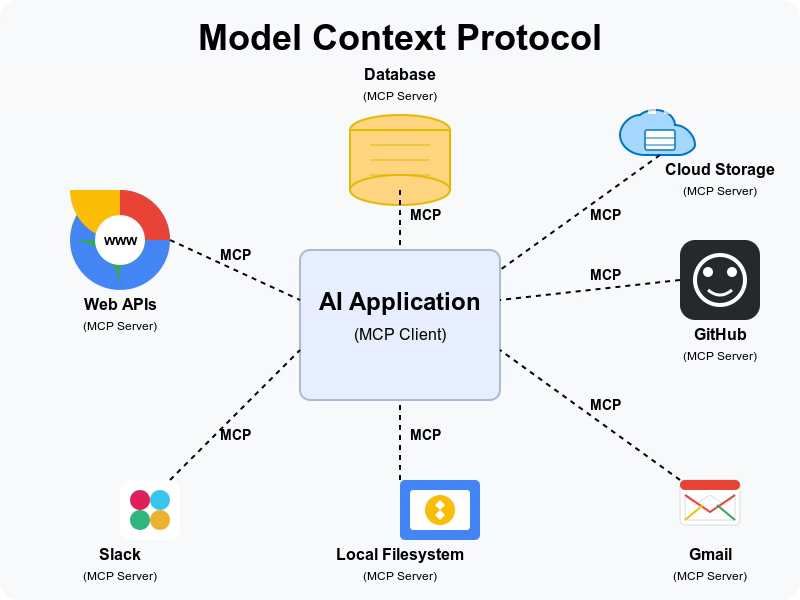
MCP follows a client-server architecture that separates concerns in the following way:
MCP Host
The user-facing AI application (like Claude Desktop, Cursor, or your custom AI app) that coordinates everything.
MCP Client
Lives inside the host application and manages secure connections to MCP servers. Each server gets its own isolated client connection.
MCP Server
External programs that expose specific capabilities to AI models like connecting to databases, file systems, APIs, or any other data source.
The communication happens through JSON-RPC, a lightweight protocol that enables secure, two-way communication between clients and servers.
Three Core Primitives
MCP organizes functionality into three main types:
Resources: Read-only data that the AI can access (like files, database records, or API responses). We can call them “things the AI can read.”
Tools: Actions the AI can perform (like creating files, sending emails, or running queries). These are “functions the AI can call.”
Prompts: Reusable conversation templates or workflows that provide structured interactions.
The importance of this design is that the AI model doesn’t need to know anything about MinIO’s S3 API, your database schema, or any specific service. It just knows how to ask for resources, call tools, and use prompts through the MCP interface.
Practical Use Cases
MCP is useful in scenarios where you need AI models to work with real, live data:
Development Workflows: AI coding assistants that can read your codebase, access your Git history, and understand your project structure in real-time.
Data Analysis: Models that can query your databases, analyze your files, and generate insights from your actual business data.
Content Management: AI that can access your document repositories, and help you manage and organize content.
Business Intelligence: Models that connect to your analytics platforms, CRM systems, and help you make data-driven decisions.
Infrastructure Management: AI that can interact with your cloud storage, monitor your systems, and help with operational tasks.
The key advantage is real-time access. Instead of feeding static data to AI models, MCP enables dynamic, contextual interactions with live systems.
Practical Example: MinIO MCP Server
Now let’s see MCP in action with a real example: the MinIO MCP Server built in collaboration with my colleague Rafa Ginard, a brilliant senior software engineer (Rafa's GitHub and Rafa's LinkedIn) who came up with this idea of connecting your MinIO object storage with any host and client, even a local LLM.
What the MinIO MCP Server Does
The server exposes MinIO object storage operations as MCP tools, allowing any MCP-compatible AI client to manage buckets and objects through natural language.
Repository: https://github.com/Rafitis/minio-mcp-server
Key Features
7 MCP Tools organized by domain:
Bucket Operations:
list_buckets: Get all available buckets with creation datesget_bucket_info: Detailed bucket metadata, policies, object count, and sizecreate_bucket: Create new buckets with validationdelete_bucket: Delete empty buckets or force delete with contents
Object Operations:
list_objects: List objects with filtering and paginationget_object_info: Get detailed object metadatadelete_object: Remove objects with version support
Architecture Highlights
Built on FastMCP: Uses the FastMCP framework for robust MCP protocol support
Async Architecture: Full async/await support for better performance
Comprehensive Validation: Input validation and error handling with proper HTTP status codes
Modular Design: Separated BucketTools and ObjectTools classes for clean organization
Quick Setup
The setup process demonstrates how streamlined MCP can be:
# Clone and install
git clone https://github.com/Rafitis/minio-mcp-server
cd minio-mcp-server
uv sync

# Configure your MinIO connection
cp .env.example .env
# Edit .env with your MinIO credentials

# Start the MCP server
uv run python src/minio_mcp/server.py
Claude Desktop Integration
To connect with Claude Desktop, you just add this configuration:
{
  “mcpServers”: {
    “minio-mcp-server”: {
      “command”: “/path/to/uv”,
      “args”: [
        “--directory”, “/path/to/minio-mcp-server”,
        “run”, “python”, “src/minio_mcp/server.py”
      ],
      “env”: {
        “MINIO_ENDPOINT”: “localhost:9000”,
        “MINIO_ACCESS_KEY”: “minioadmin”,
        “MINIO_SECRET_KEY”: “minioadmin”,
        “MINIO_SECURE”: “false”
      }
    }
  }
}
After restarting Claude Desktop, you can use natural language commands like:
“List all buckets in MinIO”
“Show me information about the ‘analytics-data’ bucket”
“Delete ‘old-backup.zip’ from the ‘archives’ bucket”
The AI model automatically translates these requests into the appropriate MCP tool calls.
Connecting with Local LLMs and Optimal Prompts
One particular aspect of MCP is its model-agnostic design. You can use the same MCP server with cloud-based models like Claude or with local models like Mistral.
Local LLM Integration
The feature/llm-rest-api-integration branch of our repository shows how to connect MCP servers with local LLMs for maximum privacy and control.
Key Benefits of Local Integration:
Privacy: Your data never leaves your infrastructure
Cost Control: No per-token pricing from cloud providers
Customization: Fine-tune models for your specific domain
Offline Capability: Works without internet connectivity
Setting Up with Enterprise LLMs
Here’s how you can connect with your company’s enterprise LLM infrastructure:
Enterprise LLM Setup (OpenAI-compatible API):
import asyncio
from openai import OpenAI
from mcp import ClientSession, StdioServerParameters
from mcp.client.stdio import stdio_client

class EnterpriseMinioMCPClient:
    def __init__(self):
        # Configure your enterprise LLM as an OpenAI-compatible client
        self.enterprise_llm = OpenAI(
            api_key=”your-enterprise-api-key”,  # Your company’s API key
            base_url=”https://llm-service.yourcompany.com/v1”  # Your company’s LLM endpoint
        )

    async def connect_to_minio_server(self, server_script_path: str):
        “”“Connect to MinIO MCP server”“”
        server_params = StdioServerParameters(
            command=”python”,
            args=[server_script_path],
            env=os.environ.copy()
        )

        # Establish connection to MCP server
        stdio_transport = await stdio_client(server_params)
        self.stdio, self.write = stdio_transport
        self.session = ClientSession(self.stdio, self.write)
        await self.session.initialize()

    async def process_query(self, query: str) -> str:
        “”“Process user query through Enterprise LLM + MinIO tools”“”

        # Get available MinIO tools
        tools_response = await self.session.list_tools()

        # Build tool descriptions for the LLM
        tools_info = “\n”.join([
            f”- {tool.name}: {tool.description}”
            for tool in tools_response.tools
        ])

        # Ask enterprise LLM which tool to use
        messages = [
            {
                “role”: “system”,
                “content”: f”You are a MinIO assistant with these tools:\n{tools_info}\n”
                          “Respond with TOOL_CALL: {{\”tool_name\”: \”name\”, \”parameters\”: {{}}}} or answer directly.”
            },
            {”role”: “user”, “content”: query}
        ]

        response = self.enterprise_llm.chat.completions.create(
            model=”your-company-model”,  # Your enterprise model name
            messages=messages,
            max_tokens=500
        )

        llm_decision = response.choices[0].message.content.strip()

        # Execute tool if LLM decided to use one
        if llm_decision.startswith(”TOOL_CALL:”):
            tool_call = json.loads(llm_decision.replace(”TOOL_CALL:”, “”).strip())
            tool_result = await self.session.call_tool(
                tool_call[”tool_name”],
                tool_call[”parameters”]
            )

            # Format result with enterprise LLM
            format_messages = [
                {
                    “role”: “system”,
                    “content”: “Format this MinIO tool result into a natural language response.”
                },
                {
                    “role”: “user”,
                    “content”: f”Query: {query}\nResult: {tool_result.content}”
                }
            ]

            final_response = self.enterprise_llm.chat.completions.create(
                model=”your-company-model”,
                messages=format_messages,
                max_tokens=1500
            )

            return final_response.choices[0].message.content

        return llm_decision

# Usage
client = EnterpriseMinioMCPClient()
await client.connect_to_minio_server(”src/minio_mcp/server.py”)
result = await client.process_query(”Show me all buckets and find the largest files in each one”)
Optimal Prompting Strategies
When working with MCP and local LLMs, these prompting techniques can help deliver a better result:
Be specific about the context:
“Using the MinIO tools, list all buckets and then show me
the 5 largest objects in the ‘backups’ bucket”
Structure multi-step operations:
“First, check what buckets exist in MinIO. Then, for the
bucket with the most objects, show me a summary of file
types and total storage used.”
Provide clear constraints:
“List objects in the ‘logs’ bucket, but only show files
from the last 7 days and limit results to 20 items”
Use domain-specific language:
“Check the health of our data lake by listing all buckets,
showing their sizes, and identifying any empty buckets
that might need cleanup”
The key: leveraging the AI’s natural language understanding while being precise about what data operations you want performed.
Performance Considerations
Local LLMs with MCP work best when you:
Choose function or tool-calling capable models (Mistral, Llama 3.2, Qwen)
Optimize context windows for your data size
Use streaming responses for real-time feedback
Implement proper error handling for network timeouts
Relevant Resources and Documentation
If you want to dive deeper into MCP, here are the essential resources:
Official Documentation: Model Context Protocol Specification - The complete technical specification
Anthropic’s MCP Guide: MCP Documentation - Practical guides and tutorials
MCP GitHub Organization: GitHub ModelContextProtocol - SDKs, examples, and community contributions
Awesome MCP Servers: A growing collection of community-built MCP servers for popular services
MCP.so: MCP.so - A web to “Find Awesome MCP Servers and Clients”
The ecosystem is expanding rapidly, with new MCP servers being built for everything from Slack and GitHub to specialized databases and custom APIs, even to write your own articles in Substack/Medium.
Key Takeaways
Model Context Protocol helps solving a big challenge in AI development: connecting models to real, live data in a standardized way, providing a universal interface that works across the entire ecosystem.
For developers, it means more time building intelligent features using AI.
For organizations, this means building AI applications that can actually work with the nuances of your data infrastructure.
For the AI ecosystem, this means faster innovation as everyone builds on shared standards and sharing this servers as open source.
The goal of the MinIO MCP Server is to demonstrate how straightforward it can be to expose powerful data operations to AI models, by creating a bridge between your object store and an LLM with just a few hundred lines of code.
Whether you’re using cloud models like Claude or local models like Mistral, the same MCP server works seamlessly.
Besides improving models to make them smarter, the future of AI relies on making models seamlessly interact with the tools and data that power our workflows.
Check out the MinIO MCP Server repository and start building your own AI-data bridges today.
Til’ next time,
Ricardo.